
Overall process of analysis in Metaflow
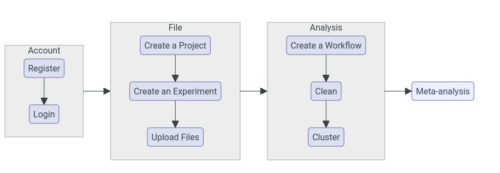
To start analyzing your FCS files with Metaflow, go to the Metaflow application website: https://apps.metaflow.bio/
- Account: Log in your account.
- Register for an account if you don't have one already.
- Reset your password if you forgot it.
- File management: Upload and manage the files you want to analyze.
- Create a new "Project" or select an existing Project.
- Create a new "Experiment" or select an existing Experiment inside your chosen Project.
- Upload files or select existing files inside your chosen Experiment.
- Analysis: Identify cell populations of interest in your files.
- Create a new "Workflow" or select an existing Workflow containing your selected files.
- "Clean" or isolate particles of interest.
- "Cluster" or identify cell population of interest.
- Meta-analysis: Set-up "Meta-analysis" to compare cell populations across files.